Write readable source
TEXTv1.2 contains the narrative and natural document structure: titles, sections, paragraphs, blank lines, and lists. No HTML, Markdown, or inline styling is required.

Text2Doc turns human-readable plain text into a deterministic document model. The TEXT language carries the narrative and basic document structure, while SIDECAR adds richer semantic composition and THEME controls presentation.
Narrative + basic document structure.
Figures, tables, code blocks, injections, assets, outline, headers, and composition.
Templates and CSS determine final appearance independently of the source.
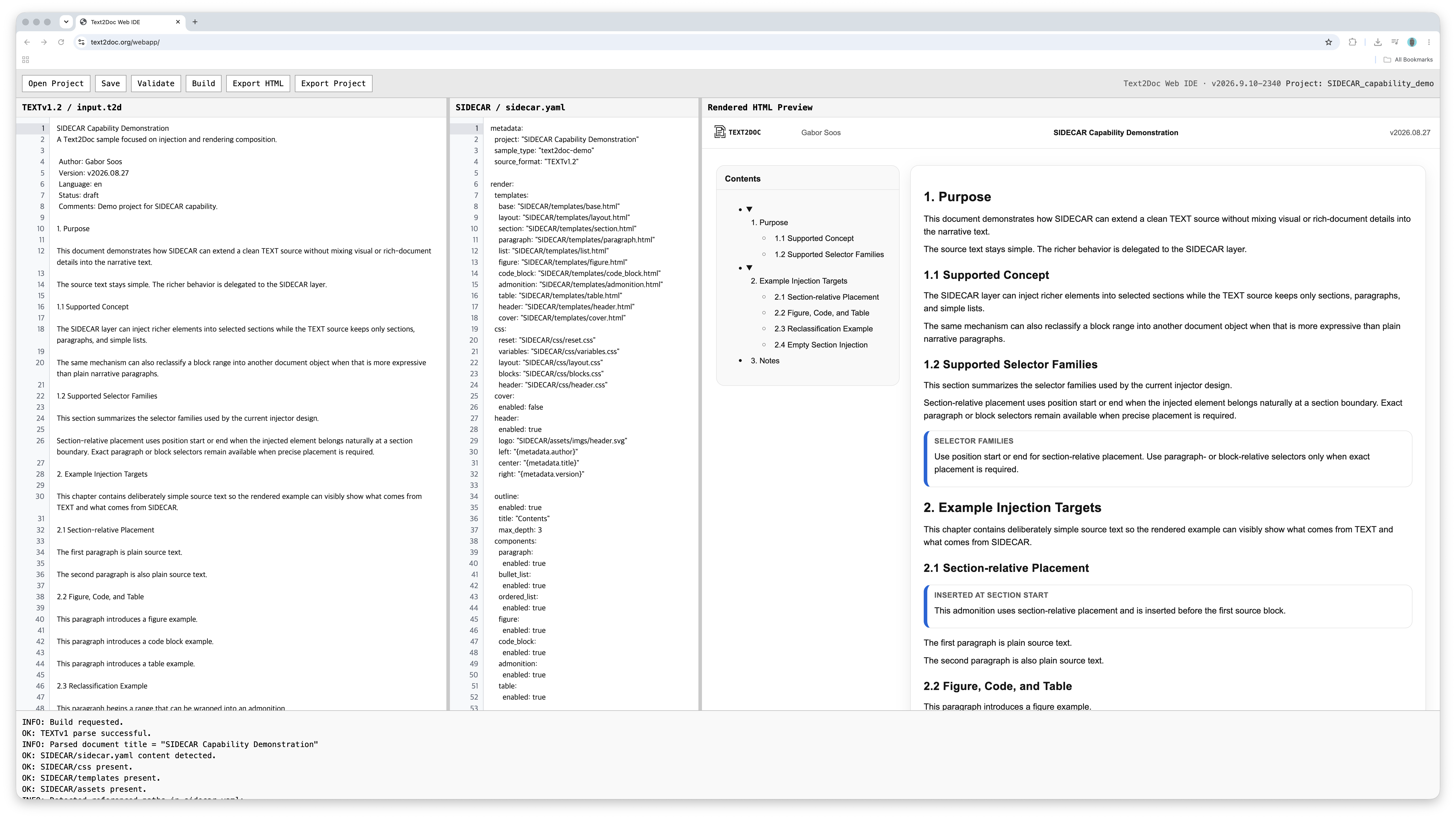
Text2Doc keeps the source readable: TEXT defines the document’s basic structure, SIDECAR adds semantic composition, and THEME controls presentation.
TEXTv1.2 contains the narrative and natural document structure: titles, sections, paragraphs, blank lines, and lists. No HTML, Markdown, or inline styling is required.
SIDECAR keeps richer document behavior separate from the narrative source: injections, figures, code blocks, tables, outline, header, assets, and render composition.
Templates and CSS define the final document appearance independently of the source. The renderer combines the validated layers into stable output.
Create or edit the readable TEXT source and its project-side resources.
Parse the source and verify that the document follows the deterministic TEXT rules.
Apply SIDECAR and THEME, then render the validated document into the final output.
One native Text2Doc binary provides the command-line workflow, the private local Web IDE, and the project-aware Language Server Protocol. Use the same executable for interactive work, editor integration, scripting, automation, and CI.
Run text2doc build, text2doc init, and the other command-line operations directly. Run text2doc serve to start the private local server and embedded WebAPP on 127.0.0.1:8080. Run text2doc lsp to expose project-aware authoring support over stdio. A temporary API key is generated for Local Web IDE sessions and expires when the process stops.
One native executable for CLI workflows and the private local Web IDE.
Download Text2Doc for WindowsOne native executable for CLI workflows and the private local Web IDE.
Download Text2Doc for macOSPortable native executable for CLI workflows and the private local Web IDE.
Download Text2Doc for GNU/LinuxThe VSIX registers .t2d, adds lightweight syntax highlighting, and launches text2doc lsp. Parsing, validation, SIDECAR handling, and project intelligence remain inside the native Text2Doc binary.
Download Text2Doc VSIX · v2026.9.10-2340Recover existing Markdown documents as complete, editable Text2Doc projects. Headings, paragraphs, and lists become native TEXT, while tables, images, and fenced code blocks are reconstructed through SIDECAR. Each recovered project includes standard templates, CSS, local image assets, and a recovery report — ready for rendering.
./text2doc recover markdown document.md -o recovered-project
./text2doc build recovered-project
# install on Windows
Expand-Archive .\text2doc-v2026.10.10-820-x86_64-pc-windows-gnu.zip -DestinationPath .

# install on macOS
tar -xzf text2doc-v2026.10.10-820-aarch64-apple-darwin.tar.gz
xattr -d com.apple.quarantine text2doc

# install on GNU/Linux
tar -xzf text2doc-v2026.10.10-820-x86_64-unknown-linux-musl.tar.gz

# CLI workflow
./text2doc init my_project
./text2doc build my_project
./text2doc build-pdf my_project

# private local Web IDE
./text2doc serve

# editor-neutral Language Server Protocol
./text2doc lsp

# optional VS Code client
code --install-extension text2doc-v2026.9.10-2340.vsix

# optional
./text2doc serve --port 8080
./text2doc serve --no-browser
text2doc serve starts the server on
http://127.0.0.1:8080, opens the embedded WebAPP by default, and prints the temporary API key.
On Windows use .\text2doc.exe; on macOS and GNU/Linux use ./text2doc.
text2doc build-pdf my_project prepares the print-ready document.
Open the generated print HTML in Chrome and use Print → Save as PDF to create the final PDF
with its dedicated cover, page layout, headers, and print styling.
text2doc lsp over stdio,
or install the optional Text2Doc VSIX for Visual Studio Code.
Start with a simple TEXT document, explore SIDECAR composition, or see the rendered result.
Download the structured sample that defines the pure text rules.
Download sampleSee injections, assets, render composition, and richer document structures.
Download demo projectOpen the HTML demo to see how a clean source becomes a composed document.
View demo HTMLSee the print-ready result with its dedicated cover, page layout, headers, and document styling.
View generated PDFText2Doc is designed for documents that should remain readable in source form and stable in rendered form.